
Authorization v2.1
Once the PSU has been authenticated, the LFI presents the consent details so the PSU can review and approve (or decline) the request. This is the authorization step — the PSU makes an informed decision about granting the TPP access to their accounts or authorizing a payment.
The exact content of the authorization page varies by consent type. Each consent type defines its own authorization page requirements in its User Experience section.
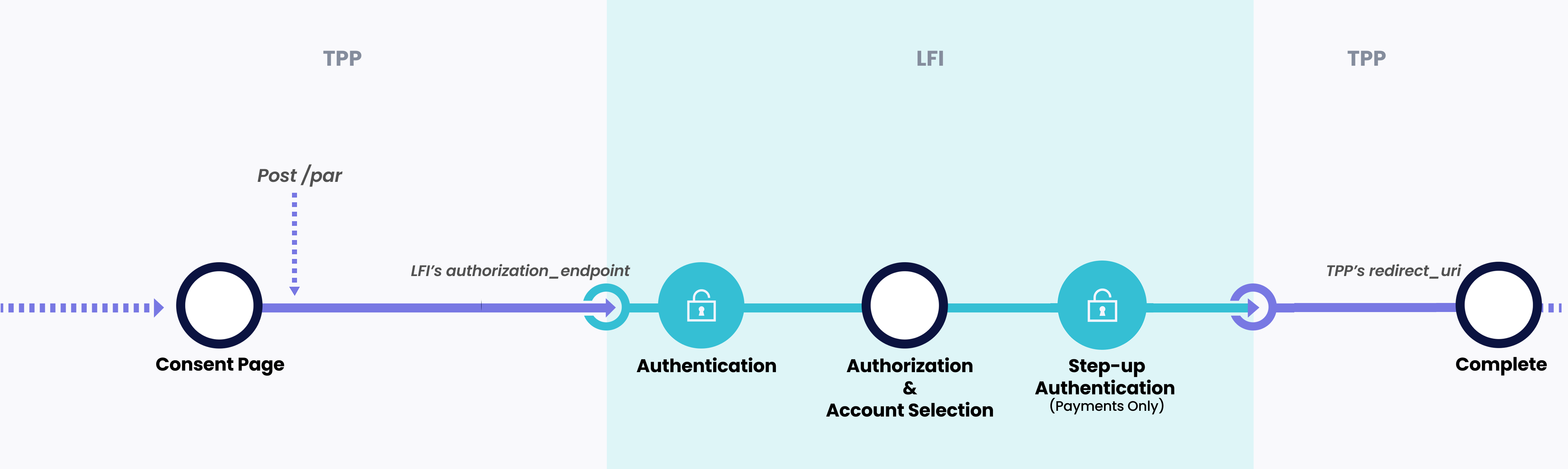
Where authorization sits in the consent flow
Click to expand
- The TPP creates a consent and receives a redirect URI from the API Hub
- The PSU's device opens the LFI's Authorization Endpoint
- The LFI authenticates the PSU using Strong Customer Authentication (SCA)
- The LFI presents the consent for authorization
- The LFI completes the interaction and redirects back to the TPP.
Principles
The following principles govern authorization pages across all consent types:
| # | Principle | Detail |
|---|---|---|
| 1 | AlTareq branding | The AlTareq logo and ecosystem branding MUST be displayed on every authorization page. The PSU MUST be able to clearly identify that the authorization is part of the AlTareq Open Finance ecosystem. Action buttons and naming conventions related to AlTareq MUST be preserved. |
| 2 | Informed consent | The authorization page MUST clearly explain what the PSU is authorizing. All material details — such as the TPP name, data permissions, payment amounts, payee details, and consent duration — MUST be presented before the PSU confirms. |
| 3 | Progress indication | The authorization page MUST include a progress indicator showing the PSU where they are in the consent journey (e.g. Consent > Authorize > Complete). |
| 4 | Consent-specific content | The content of the authorization page MUST accurately reflect the consent type. For example, data-sharing consents present account selection and permission details, while payment consents present payee name, IBAN, amount, and payment schedule. |
| 5 | No obstacles | LFIs MUST NOT use language, design, or interaction patterns that discourage the PSU from granting consent. The authorization page MUST NOT steer the PSU toward declining, introduce unnecessary friction, or present the consent in a misleading way. |
| 6 | Parity of experience | The authorization experience MUST be consistent with the quality of the LFI's own digital channels. It MUST NOT load slower, use confusing language, or more obstructive than equivalent in-app interactions. |
| 7 | Clear actions | The PSU MUST be presented with unambiguous options to approve or decline the consent. The action to approve MUST be clearly labelled and easy to locate. |
| 8 | CX certification | The authorization page MUST be submitted as part of CX certification prior to production. Any material changes to a production authorization page MUST be resubmitted for review and approval. |
Authorization pages by consent type
The authorization page content varies depending on the type of consent being authorized. Refer to the User Experience page for each consent type for the specific authorization page requirements and interactive wireframes:
- Bank Data Sharing — Account selection and data permission review
- Single Instant Payment — Payment amount, payee, and Confirmation of Payee details
- Variable On Demand — Payment rules, creditor details, and maximum limits
- Fixed On Demand — Fixed amount per-payment details and creditor information
- Variable Periodic Schedule — Recurring payment schedule with variable amounts
- Fixed Periodic Schedule — Recurring payment schedule with fixed amounts
- Variable Defined Schedule — Pre-defined payment dates with variable amounts
- Fixed Defined Schedule — Pre-defined payment dates with fixed amounts
- Delegated SCA — Per-payment authentication with delegated consent