Products and Leads — User Experience 5 min read
The following wireframes and guidelines outline the essential information and functionality that must be provided to the User, while enabling TPPs to implement additional features and capabilities to address their commercial and service-specific needs.
While you may adapt visual elements such as colour palette, fonts, and styling, you must not alter the meaning, clarity, or completeness of the product information presented to the User. The style and presentation of the returned product information within the 'Product Features & Characteristics' section falls within the competitive domain of TPPs, enabling them to design and implement their own customer experience — including how product information is summarised and how detailed information is presented.
Your Products and Leads user experience must be submitted as part of CX certification prior to production, and any material changes to a production implementation must be re-submitted for review and approval.
Required experience for Products and Leads
| ID | Requirement | UX Guidelines Statement |
|---|---|---|
| 1 | MAY | Include additional text and information about the service they will be providing to the User. This additional information should clarify that the products returned will NOT include:
|
| 1.1 | MUST | Request that the User selects the LFI into which their salary is currently deposited, and confirm whether they would be willing to switch banks and have their salary deposited into a different LFI if required by the product's eligibility criteria. This information is necessary for LFIs to determine whether the User is an existing customer and to assess eligibility for specific products or rates. |
| 1.2 | MUST | Allow the User to select whether they only wish to see Shari'a compliant banking products. When Shari'a compliant products are displayed, the appropriate Shari'a compliant product names must be used. |
| 1.3 | MUST | Allow the User to select the type of Banking products they are interested in. |
| 1.4 | MUST | Display a list of optional Preference options that the User can populate to filter LFI products that do not meet their requirements or personal circumstances. TPPs MAY:
|
| 1.5 | MUST | Provide the User the option on what order or ranking the returned products are displayed to them, and ensure products are displayed in the selected order. Depending on the product type the order options could be:
|
| 1.6 | MUST | Show a list of LFIs the product information will be requested from, using LFI logos and brand names as defined in the Trust Framework Directory (or the Alternative Brand Name provided by the LFI for Shari'a compliant products). The User must be able to de-select specific LFIs they do not wish to receive products from. By default "All LFIs" must be selected. |
| 1.7 | MUST | Show a "Loading Products" screen when the User selects "View Products" to indicate that products are being requested from the selected LFIs. |
| 2.1 | MUST NOT | Give preference to or recommend products based on commercial agreements with specific LFIs. |
| 2.2 | MAY | Choose how they show the returned product information and the level of data displayed to the User based on the service they wish to provide. |
| 2.3 | MUST | Provide three options when the User selects an individual product:
|
| 2.4 | MUST | When the User selects the "Apply Now" option:
|
| 2.5 | MUST | When the User selects the "Request contact from bank" option:
|
Sample user journeys
Example 1 — User requests product comparison and selects 'Apply Now'
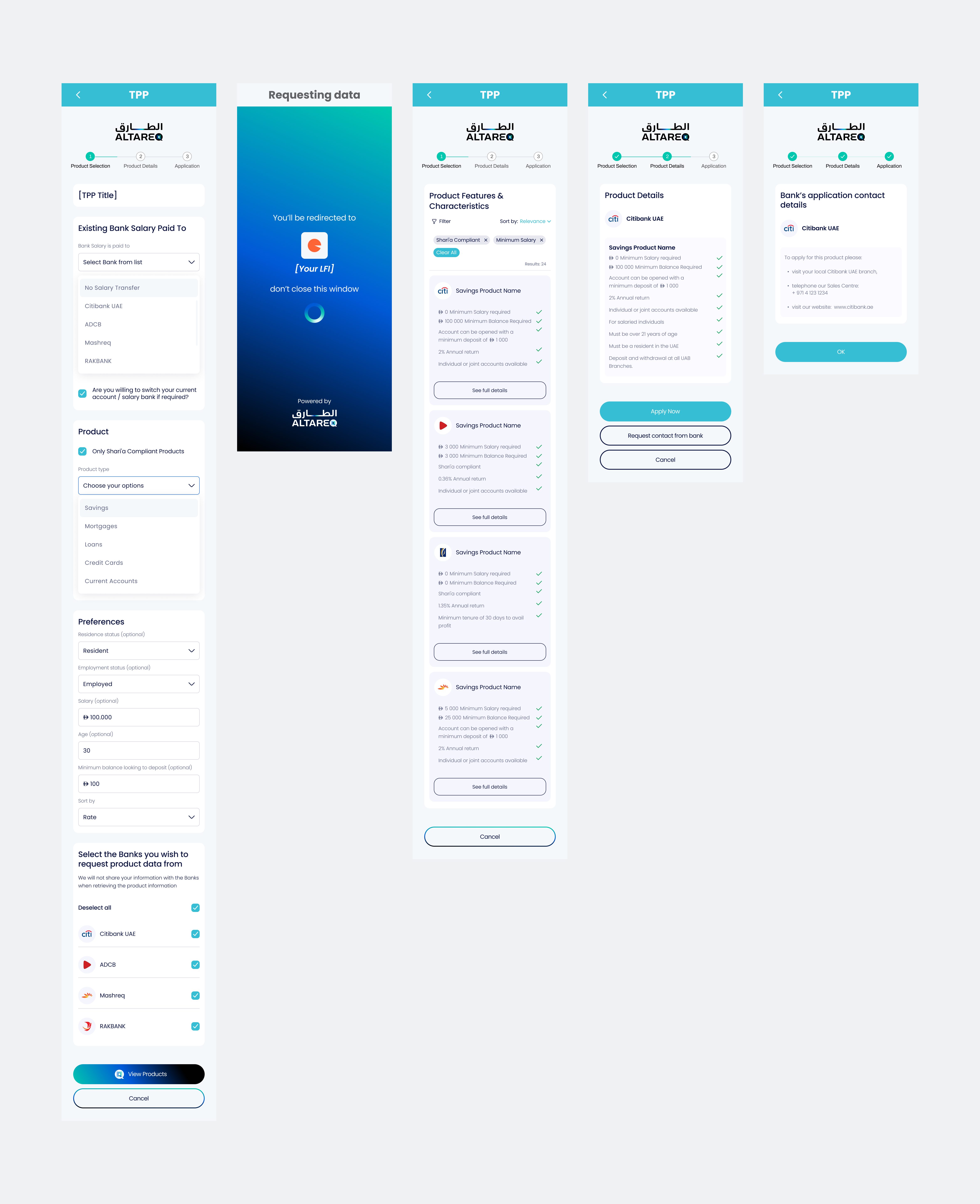
The following example reflects the standard journey in which the User is presented with a list of products from LFIs that meet their stated requirements. Based on the information displayed, the User selects a product, resulting in a redirection to the LFI's application site to begin the application process.
Example 2 — User requests product comparison and selects 'Request contact from bank'
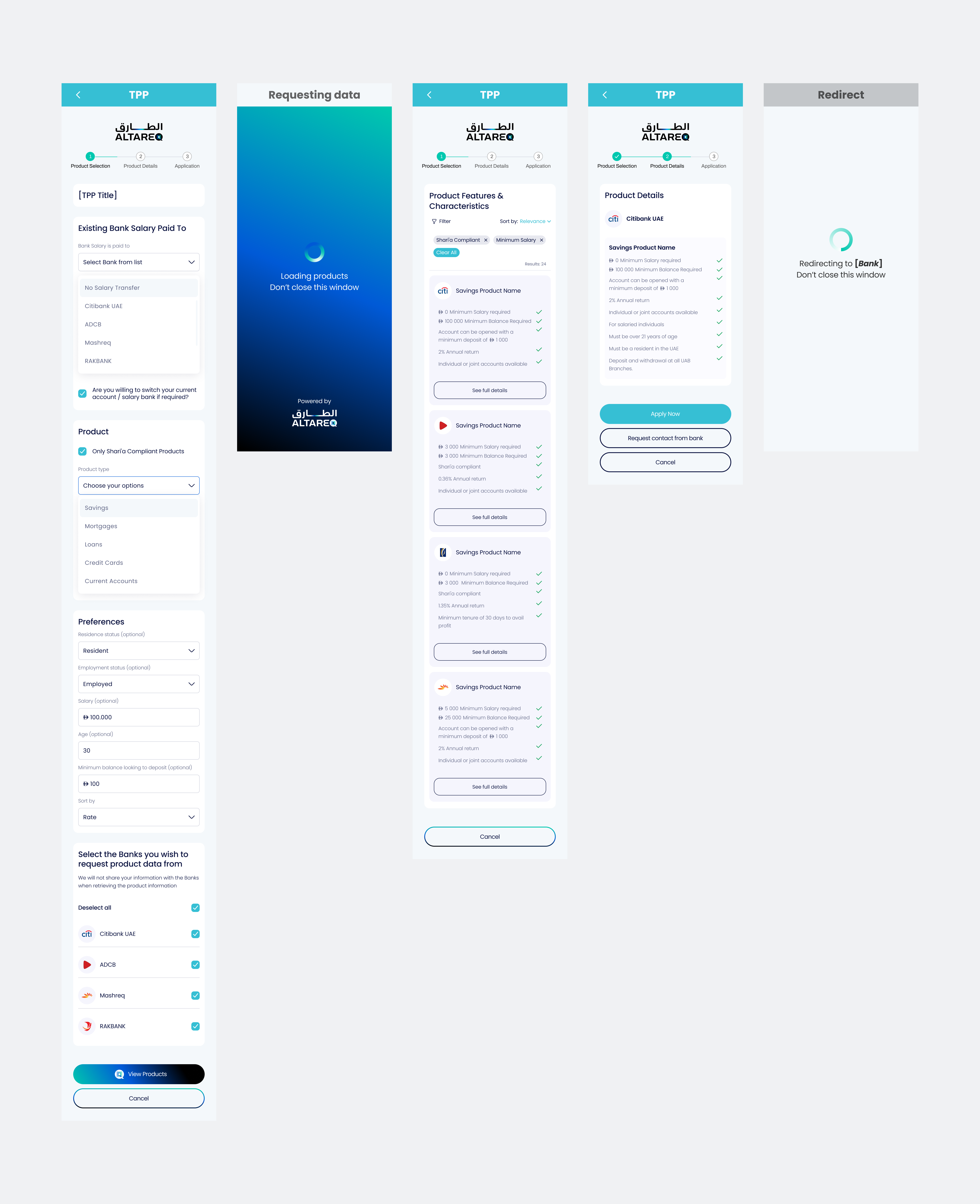
The following example reflects a journey variation in which the User selects the 'Request contact from bank' option, indicating that they wish to be contacted by the LFI to further discuss the product before proceeding with an application. When this option is selected, the TPP will invoke the LFI's Leads endpoint, submitting the User's contact details along with their Emirates ID. In this journey, the User is not redirected from the TPP's site to the LFI's site.
Example 3 — User requests product comparison and selects 'Apply Now' — No Application URL Provided
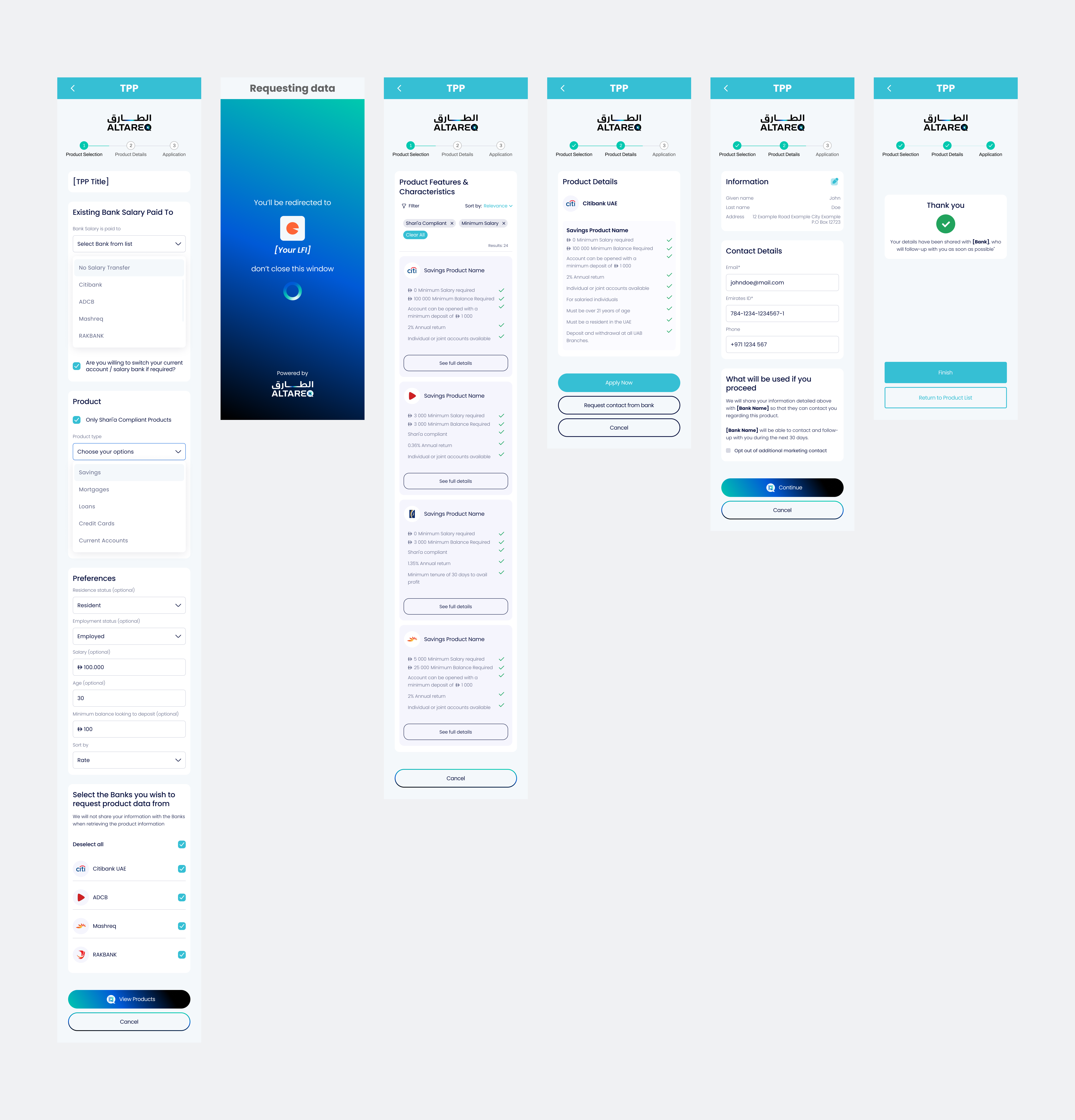
The following example reflects a journey variation in which the LFI has NOT provided an application URL for redirecting the User in the Product response. Instead, the LFI has included instructions specifying where and how the User can apply for the selected product. When the User selects the 'Apply Now' option, the TPP must display the application instructions provided by the LFI, rather than redirecting the User to the LFI's application site.