
1
Consent
2
Authorize
3
Complete
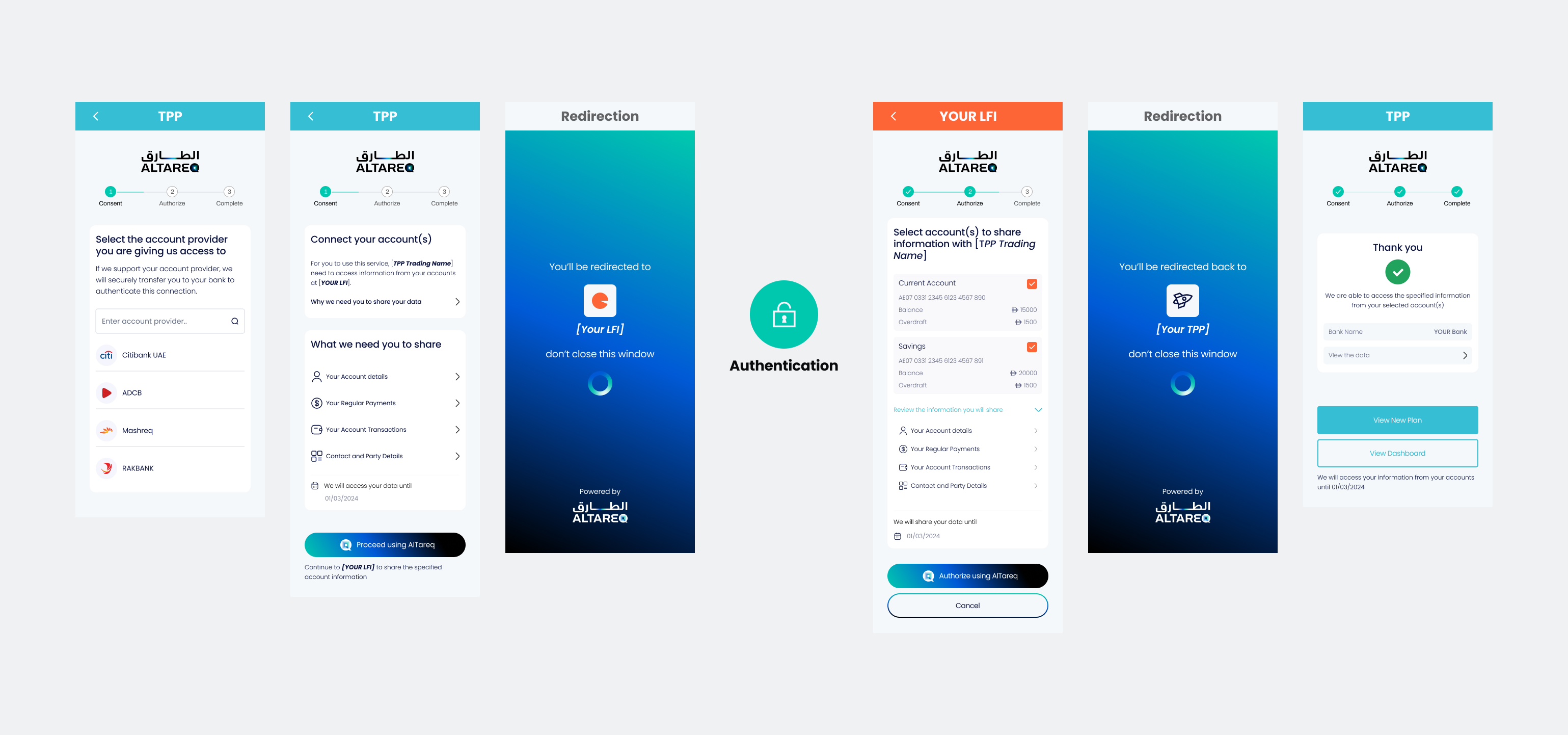
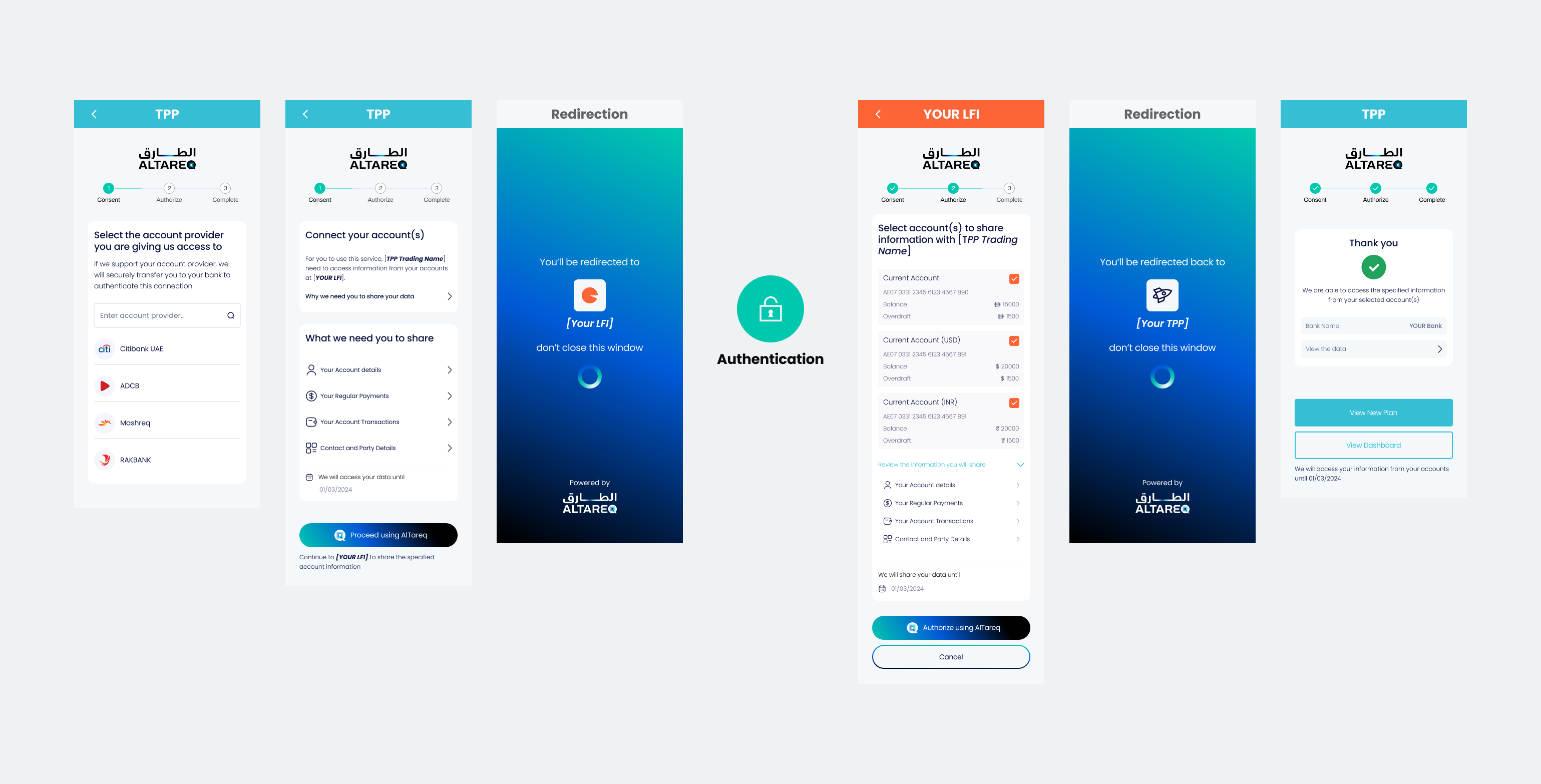
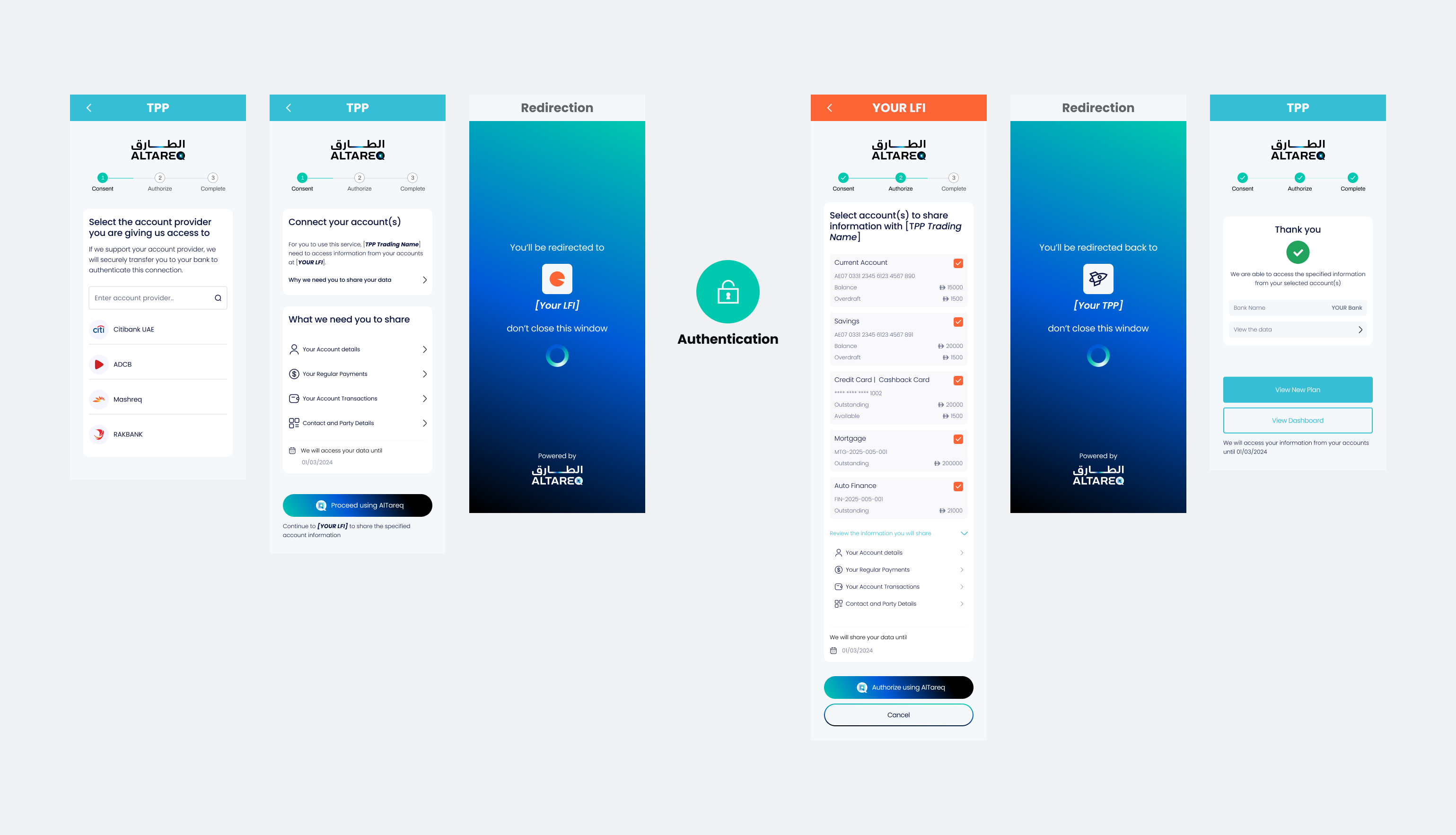
Before a customer is redirected to Open Finance to consent to Data Sharing, you must present a Consent Page that clearly explains what the customer is consenting to and collects their explicit, informed consent. This page must accurately reflect the scope, purpose, and nature of the data being shared. The examples and interactive wireframes below define the expected structure, content, and behaviour of the Consent Page and must be followed.
While you may adapt visual elements such as colour palette, fonts, and styling, you must not alter the meaning, clarity, or completeness of the consent content, and the representation of AlTareq (including logos, naming, and action buttons) must be preserved. Your Consent Page must be submitted as part of CX certification prior to production, and any material changes to a production Consent Page must be re-submitted for review and approval.
Customise the authorization_details object below and watch the wireframes above update live. Try changing permissions, account types, date ranges, or the TPP name to see how the pages respond, or pick one of the scenarios beside the editor to load a preset consent.
Configure the mock accounts the authenticated user holds at their bank.
The table below outlines the text displayed to users on the Consent Page when they expand each data category associated with the consent permissions.
| Permission | What the user sees shared |
|---|---|
ReadAccountsBasic | Basic account information (account number/ID, type of account, currency, nickname you gave it, and account holder name) |
ReadAccountsDetail | Full account information (account number/ID, type and description of account, currency, nickname you gave it, and account holder name, opening date) |
ReadBalances | Your current account balances (available balance, booked balance, credit limit/overdraft if any, and when the balance was last updated) |
| Permission | What the user sees shared |
|---|---|
ReadBeneficiariesBasic | Basic beneficiaries information (saved payee account number/ID, type, name and nickname, bank name and details, reference) |
ReadBeneficiariesDetail | Full beneficiaries information (saved payee account number/ID, type, name and nickname, bank name and details, address, reference) |
ReadStandingOrdersBasic | Basic standing orders information (payee name and nickname, reference, frequency, first/next/final payment amounts and dates, number of payments, purpose, status, type) |
ReadStandingOrdersDetail | Full standing orders information (payee name and nickname, reference, frequency, first/next/final payment amounts and dates, number of payments, purpose, status, type) |
ReadScheduledPaymentsBasic | Basic scheduled payments information (payee name and nickname, instructed amount, scheduled date/time, ID, type) |
ReadScheduledPaymentsDetail | Full scheduled payments information (payee account details, name and nickname, creditor/debtor reference, instructed amount, scheduled date/time, ID, type) |
ReadDirectDebits | Direct debits information (account ID, direct debit ID, status, frequency, mandate identification, name, previous payment amount and date) |
| Permission | What the user sees shared |
|---|---|
ReadTransactionsBasic | Basic transactions information (date/time, amount, type, description/narrative, status, reference) |
ReadTransactionsDetail | Full transactions information (date/time, amount, type, description/narrative, payee/merchant name and details, category, status, reference, currency exchange if applicable) |
| Permission | What the user sees shared |
|---|---|
ReadStatements | Account statements (monthly/periodic summaries including transaction lists, opening/closing balances, fees, interest, and period details) |
| Permission | What the user sees shared |
|---|---|
ReadProduct | Product information (details about your account's financial product, including name, features, interest rates, fees, and key terms) |
| Permission | What the user sees shared |
|---|---|
ReadPartyUser | Detailed personal details (name, date of birth, contact information, residential address) |
ReadPartyUserIdentity | Detailed personal identity details (name, date of birth, contact information, Emirates ID, nationality, residential address, employer details) |
ReadParty | Your legal or registered name as the account holder |
| Permission | What the user sees shared |
|---|---|
ReadProductFinanceRates | Details of the interest or profit rate on your mortgage, finance, or credit card. In some cases, your bank may protect this information by sending it in a locked format and issue you a code (via SMS or email). You'll need to enter this code within the service so that it can show you the rate. |
The AccountSubType field in authorization_details acts as a filter, controlling which of the user's accounts are presented for selection on the LFI Authorisation Page.
AccountSubType | LFI Authorisation Page Behaviour |
|---|---|
| Provided | Only accounts whose sub-type matches one of the specified values are shown. If the user holds no accounts of the requested sub-type, the LFI returns an error and the authorisation flow cannot proceed. |
| Not provided | All of the user's available accounts are shown for selection, regardless of account type. |
Use AccountSubType to restrict access to specific account types (e.g. Mortgage). Omit it to allow selection from all account types.
When a TPP acts on behalf of another entity (e.g. an aggregator operating under a different trading name), OnBehalfOf.TradingName can be passed to identify the entity to the user on the LFI Authorisation Page.
OnBehalfOf.TradingName | LFI Authorisation Page Behaviour |
|---|---|
| Provided | The trading name is displayed within the Authorisation Page so the user clearly understands which entity they are sharing data with. |
| Not provided | The TPP's name is displayed in place of the trading name. |
Always populate OnBehalfOf.TradingName so users see a recognisable name rather than a blank or placeholder on the Authorisation Page.