
Encrypted FinanceRates 6 min read
When a TPP holds the ReadProductFinanceRates permission and calls GET /accounts/{AccountId}/product for a credit card, finance, or mortgage account, the LFI MAY return the FinanceRates field as an encrypted JWE rather than a structured object. The TPP MUST present the rates to the customer without the unencrypted values ever reaching or being stored on its servers — decryption happens locally on the user's device using a one-time code sent to the customer by the LFI.
Encrypted finance rates are an LFI-side choice
The FinanceRates field on GET /accounts/{AccountId}/product is defined as anyOf a structured AEProductFinanceRates object or an AEJwe compact string. Each LFI decides, per product, whether to return the rate in cleartext or as an encrypted JWE. A TPP holding ReadProductFinanceRates MUST therefore be ready for either shape on every call.
- Cleartext —
FinanceRatesis a JSON object. Render the rates directly. No special handling required. - Encrypted (JWE) —
FinanceRatesis a compact JWE string. The TPP server MUST forward this opaque string to the user's device without inspecting, logging, or persisting it. Decryption happens in the browser using a one-time code the LFI sends to the customer.
Some LFIs treat product finance rates as commercially sensitive and require an additional customer-present authentication step before the rate can be revealed. The encrypted JWE shape lets the rate flow through the TPP to the customer's screen without the TPP ever holding the cleartext value.
What you need before calling this endpoint
- The Access Encrypted Resource Data optional certification — the TPP MUST hold this certification with Nebras before it requests
ReadProductFinanceRateson any consent. An uncertified TPP MUST NOT includeReadProductFinanceRatesin theauthorization_detailsat consent creation; the API Hub rejects the consent if it does. See Access Encrypted Resource Data. - A consent that includes
ReadProductFinanceRates— this permission MUST be requested in theauthorization_detailswhen the TPP creates the consent. See Step 1 — Constructing Authorization Details. - An active customer-present session — when the consent carries
ReadProductFinanceRates, the TPP MUST only callGET /accounts/{AccountId}/productwhile the customer is actively using the TPP application. Background or scheduled calls are not permitted on a consent that carries this permission, because the encrypted-rate flow requires the customer to receive and enter the one-time code in real time. - A valid access token and the FAPI headers for a customer-present call —
x-fapi-interaction-id,x-fapi-auth-date, andx-fapi-customer-ip-address. Because the call is always customer-present (see above),x-fapi-customer-ip-addressMUST be set to the customer's device IP on every request; omitting it is not permitted on this endpoint when the consent carriesReadProductFinanceRates. See Request Headers.
Call the product endpoint as normal
/accounts/{AccountId}/productWhether the LFI returns cleartext or an encrypted JWE, the request itself is unchanged. Make the call as you would for any other Bank Data Sharing endpoint:
import crypto from 'node:crypto'

const productResponse = await fetch(
  `${LFI_API_BASE}/open-finance/v2.1/accounts/${accountId}/product`,
  {
    headers: {
      Authorization:                `Bearer ${access_token}`,
      'x-fapi-interaction-id':      crypto.randomUUID(),
      'x-fapi-auth-date':           lastCustomerAuthDate,
      'x-fapi-customer-ip-address': customerIpAddress,
    },
    // agent: new https.Agent({ cert: transportCert, key: transportKey }),
  }
)

const { Data: { Product } } = await productResponse.json()
const product = Product[0]
Example response — cleartext
{
  "Data": {
    "Product": [
      {
        "AccountId": "acc-001",
        "ProductId": "credit-card-platinum",
        "ProductType": "CreditCard",
        "ProductName": "Platinum Credit Card",
        "FinanceRates": {
          "ProductFinanceRateProperties": [
            {
              "RateType": "PurchaseAPR",
              "Rate": "21.99",
              "RateApplication": "OnOutstandingBalance"
            }
          ]
        }
      }
    ]
  },
  "Links": {
    "Self": "https://rs1.altareq1.sandbox.apihub.openfinance.ae/open-finance/v2.1/accounts/acc-001/product"
  },
  "Meta": { "TotalPages": 1 }
}
Example response — encrypted JWE
{
  "Data": {
    "Product": [
      {
        "AccountId": "acc-001",
        "ProductId": "credit-card-platinum",
        "ProductType": "CreditCard",
        "ProductName": "Platinum Credit Card",
        "FinanceRates": "eyJhbGciOiJQQkVTMi1IUzUxMitBMjU2S1ciLCJlbmMiOiJBMjU2R0NNIiwicDJzIjoiNGtBWG..."
      }
    ]
  },
  "Links": {
    "Self": "https://rs1.altareq1.sandbox.apihub.openfinance.ae/open-finance/v2.1/accounts/acc-001/product"
  },
  "Meta": { "TotalPages": 1 }
}
Apart from FinanceRates, every other field in the response is returned in cleartext in both shapes — Charges, DepositRates, ProductName, Tenor, and so on. Only FinanceRates is ever encrypted.
Branch on whether FinanceRates is a string
If FinanceRates is a JSON object, render its ProductFinanceRateProperties directly. If it is a string, treat it as an opaque compact JWE and forward it to the customer's browser. The TPP server MUST NOT attempt to decrypt the JWE, parse its header beyond detecting the string type, log its contents, or persist it.
// FinanceRates is anyOf { object | string } per the OpenAPI spec.
// A string value is a compact JWE that must be decrypted on the user's device.
const financeRates = product.FinanceRates
const isEncrypted  = typeof financeRates === 'string'

if (isEncrypted) {
  // Forward the opaque JWE to the browser. Do not parse, log, or persist it.
  return res.json({ accountId, productId: product.ProductId, financeRatesJwe: financeRates })
}

// Cleartext path — render the rates directly from the structured object
return res.json({ accountId, productId: product.ProductId, financeRates })
The encrypted JWE is opaque to the TPP. Pass it through to the browser response and discard the server-side copy as soon as the response is sent. Do not write the JWE to application logs, request traces, or analytics pipelines — even though it is encrypted, persisting it would put the TPP in scope of the encrypted-rate handling requirements documented in Access Encrypted Resource Data.
Render an OTP input on the user's device
When the LFI returns an encrypted FinanceRates, it also sends a one-time code to the customer directly, through a channel the LFI controls — an SMS, an email, or a push notification in the LFI's banking app. The TPP MUST display an input field where the customer can type that code, and a short explanation that matches the wording shown to the customer on the consent screen (“Your bank has sent you a one-time code — enter it below to see your finance rate”).
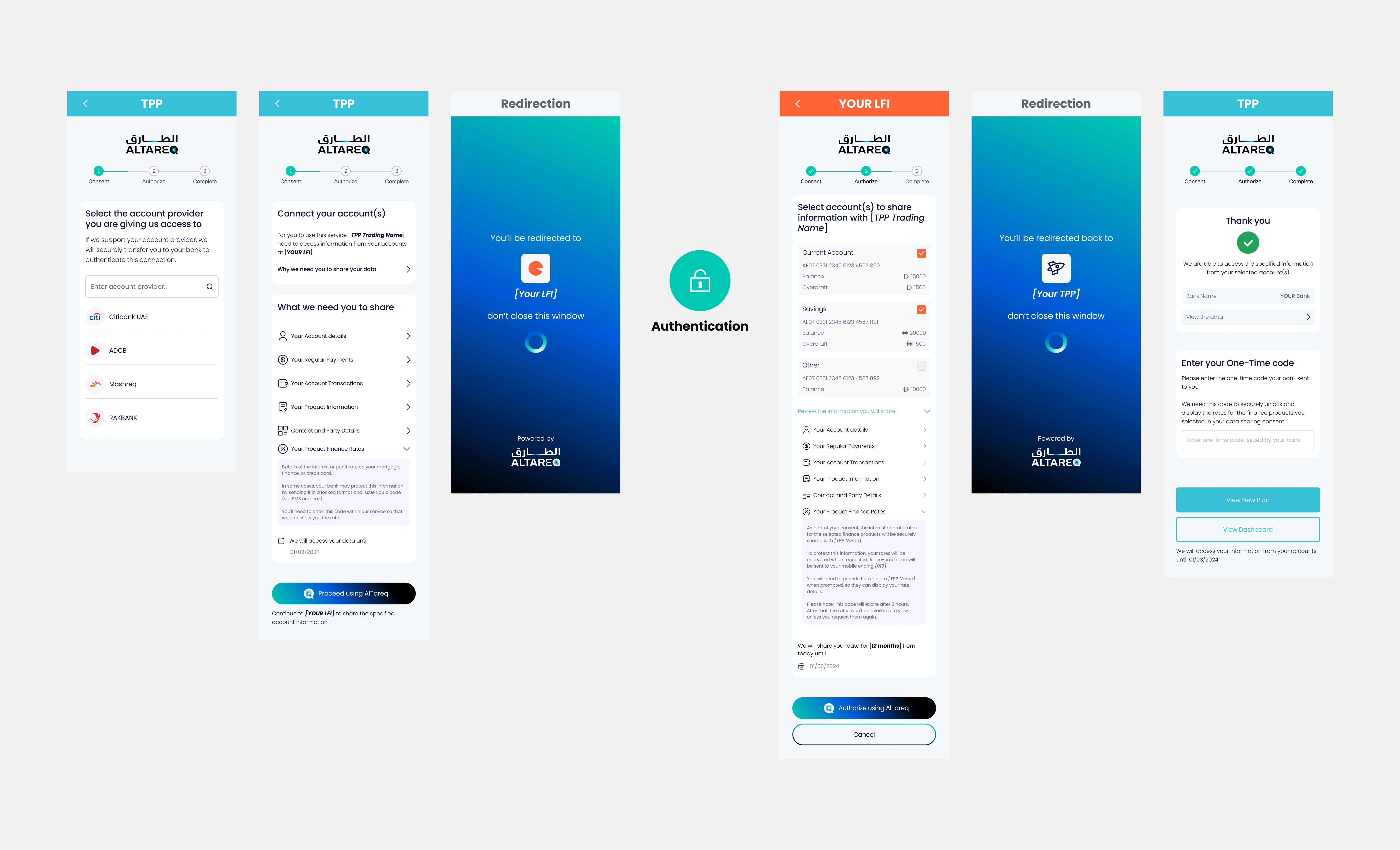
What the customer receives
The LFI sends the code to the customer directly — the TPP never sees it. The message names the product, names your TradingName so the customer can tie it back to your application, and carries a 30-minute validity. Knowing the shape of the message helps you word your own prompt consistently with what the customer is reading on their phone:
ALTAREQ BANK: You requested your Platinum Credit Card finance rate via BudgetBuddy. Your code is 482915. Valid 30 min. If you didn't request this, ignore this message and never share this rate.
- Customer-present only — this flow only works when the customer is actively using the TPP. Do not call
GET /accounts/{AccountId}/producton a schedule when you require the encrypted rate; there is no way to decrypt the JWE without the customer entering the OTP. - Display the rate types you are about to reveal — tell the customer which product the OTP unlocks (for example, “Platinum Credit Card — purchase APR”).
- Offer to resend — if the customer does not receive the code, the TPP may re-call
GET /accounts/{AccountId}/productto ask the LFI to issue a fresh code. Respect the rate limits described in Step 6 — Rate limits and retries.
Use the OTP as the PBES2 password
The JWE is encrypted with PBES2-HS512+A256KW for key wrapping and A256GCM for content encryption. The customer's one-time code is the PBES2 password; the JWE header carries the salt and iteration count, so the TPP does not need any additional material to decrypt.
Decryption MUST run on the customer's device — the OTP and the decrypted rate MUST NOT be sent to the TPP server. Use a JOSE library loaded directly into the page, and bind the form submit to a local handler:
<!-- Run inside the user's browser. The OTP and the decrypted rate
     MUST NOT be transmitted back to your servers. -->
<script type="module">
  import { compactDecrypt } from 'https://esm.sh/jose@5'

  const form  = document.getElementById('otp-form')
  const input = document.getElementById('otp')
  const out   = document.getElementById('finance-rates')

  // financeRatesJwe was injected into the page by the server in Step 2
  const jwe = window.__FINANCE_RATES_JWE__

  form.addEventListener('submit', async (e) => {
    e.preventDefault()
    const otp = input.value.trim()

    try {
      const { plaintext } = await compactDecrypt(
        jwe,
        new TextEncoder().encode(otp),
      )
      const rates = JSON.parse(new TextDecoder().decode(plaintext))
      renderRates(rates, out)
    } catch (err) {
      // PBES2 decryption failure → wrong OTP. An expired JWE still decrypts;
      // the TPP enforces the 30-minute window via the exp claim (see Step 5).
      showError('That code did not work. Request a new one and try again.')
    }
  })
</script>
The OTP MUST be consumed in the browser. Do not POST it to your server for “server-side decryption”, do not include it in analytics events, and do not echo it back into a form field that submits to your domain. The same rule applies to the decrypted FinanceRates object: keep it inside the page's JavaScript scope, render it into the DOM, and discard it when the customer navigates away.
jose (Node.js, browser) and jwcrypto (Python) both support PBES2 JWE. However, decryption MUST happen on the user's device, which in practice means JavaScript loaded into the customer's browser or a native mobile SDK. Server-side Python/Node code paths are not appropriate for this step.
The 30-minute display window
The JWE carries a fixed 30-minute lifetime as an exp claim inside its plaintext, set by the LFI. Within that window the TPP MAY re-decrypt and re-render the rate as the customer navigates between screens, provided the OTP is still held in browser memory.
Decryption does not stop working when the window closes — a JWE and its OTP can technically be decrypted at any later time, so the 30-minute limit is not enforced by the cryptography. The TPP MUST enforce it: after decrypting, the TPP MUST read the exp claim from the plaintext and MUST NOT display the rate, or re-decrypt it for display, once exp has passed. This obligation is part of the TPP's Access Encrypted Resource Data certification.
// The JWE carries a 30-minute exp claim. Decryption still works past that
// point — the TPP MUST NOT display the rate once exp has passed. Track the
// expiry on the client so the UI can prompt for a fresh request proactively.
//
// You can pass the issuance time alongside the JWE when you serve the page —
// the JWE itself does not carry a parseable claim because it is opaque to the
// TPP server. The 30-minute window is a normative LFI rule, not a value you
// negotiate.
const JWE_TTL_MS = 30 * 60 * 1000
const expiresAt  = issuedAt + JWE_TTL_MS

if (Date.now() >= expiresAt) {
  // Re-fetch GET /accounts/{AccountId}/product to obtain a fresh JWE
  // (and a fresh OTP sent to the user's device). Honour the rate limit.
}
The OTP keeps working after 30 minutes — nothing in the JWE itself prevents a late decryption. The window is held closed only by the TPP checking exp and by the certification commitments the TPP makes to Nebras. Treating exp as advisory, or relying on decryption to “just fail”, is a certification breach.
When the window closes mid-session, prompt the customer to request a fresh code via a new call to GET /accounts/{AccountId}/product rather than continuing to show a stale rate. The customer's consent is unaffected — only the 30-minute display window has expired.
LFI-enforced caps on encrypted-rate requests
Each call to GET /accounts/{AccountId}/product that returns an encrypted FinanceRates triggers a fresh OTP to the customer. LFIs MUST rate-limit these requests per consent to prevent OTP spam, while leaving enough headroom for legitimate retries (a code not received, a typo, an expired window).
| Rule | Limit | Rationale |
|---|---|---|
| Minimum interval between requests | 60 seconds per consent per account | Lets the customer ask for a fresh OTP if the first code is delayed, without enabling rapid-fire spam. |
| Daily cap | 12 fresh OTPs per consent per account per rolling 24 hours | Covers retries and repeated re-display across the day, and acts as a backstop against runaway message volume rather than a limit normal traffic should approach. |
| Decryption attempts | Unbounded within the 30-minute window of a single JWE | Re-decrypting an already-issued JWE in the customer's browser does not contact the LFI and so is not rate-limited. |
Handling the 429 response
When either limit is breached, the LFI rejects the entire GET /accounts/{AccountId}/product request with 429 Too Many Requests. The API Hub forwards the response unchanged, so the TPP receives the same status and headers the LFI emitted — HTTP 429, no response body, a Retry-After header containing the integer seconds until the next call would succeed, and the echoed x-fapi-interaction-id for correlation.
HTTP/1.1 429 Too Many Requests
Retry-After: 60
x-fapi-interaction-id: 7c9e6679-7425-40de-944b-e07fc1f90ae7
- Read
Retry-Afterand surface a customer-facing message that includes the wait — "Please wait about a minute and try again" for short waits, "You've reached today's limit for viewing this rate — please try again later" when the daily cap is the cause. - Do not auto-retry inside the wait window. The LFI will reject again and the customer will receive another code request that cannot succeed.
- A
429never means the consent is invalid — it means too many fresh OTPs have been requested in too short a window. Other Data Sharing endpoints continue to work normally for this consent during the wait.
If the TPP did not request ReadProductFinanceRates on the consent, the response is a normal 200 with the FinanceRates field simply absent from the Product object — not a 429, not a 403. Treat these as two distinct conditions in your UI: permission-not-granted should prompt the customer to grant the permission on a new consent; 429 should prompt them to wait.
Normative rules for handling encrypted FinanceRates
- The TPP MUST NOT transmit, store, log, or otherwise process the unencrypted
FinanceRateson its servers in any form or capacity. The decrypted value lives only in the customer's browser session. - The TPP MUST perform all decryption of
FinanceRateslocally on the user's device, solely for the purpose of displaying the rate to the customer. - The TPP MUST NOT interact with the encrypted or unencrypted
FinanceRatesin any manner other than as described in this guide. - The TPP MUST submit its architectural plan for decryption and display of
FinanceRates— including the relevant browser-side source — to Nebras for inspection and approval as part of the Access Encrypted Resource Data certification. Material changes to that process post go-live require Nebras sign-off before they are deployed. - The TPP MUST present the decrypted rate accurately and in context — for example, labelling a credit card APR as “purchase APR” rather than “interest rate” — so the customer sees the rate faithfully as the LFI provided it.